Debugging Made Easy: The Built-In Debug Tool in Action
Intro: Debugging Without the Pain One of the biggest frustrations in game development is debugging complex player controllers. Colliders don’t align, stamina drains too quickly, or IK offsets don’t match — and without visibility, you’re left guessing. The Modular Third-Person Framework includes a built-in Debug Tool that makes testing, tuning, and troubleshooting simple. With live state tracking, collider and IK visualization, and fully toggleable debug flags, you get the control you need to iterate faster.
The Challenge: Blind Debugging in Unity Without a proper debug solution, developers waste hours:
- Hunting through inspector values while the game is running.
- Restarting play mode just to toggle settings.
- Struggling to see which state the player is actually in.
- Guessing when colliders or IK targets don’t align.
This slows down iteration and makes controllers harder to refine.
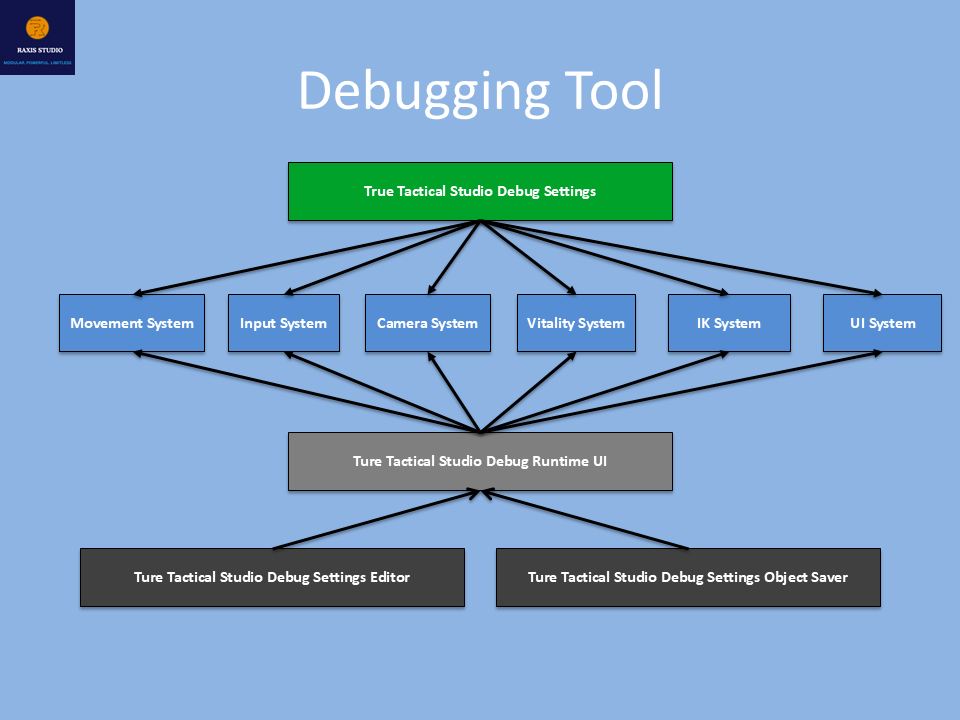
The Solution – Debug Tool in the Framework The Debug Tool gives you full visibility into the player’s state and subsystems while running the game. Key Features
- Live State Tracking → always know which movement state the player is in (Idle, Walk, Climb, Parkour, Cover, Swim, Dive, etc.).
- Collider Visualization → see colliders adapt dynamically during crouch, cover, parkour, and swimming.
- IK Debugging → foot and hand IK targets are drawn live, so you can confirm alignment.
- Vitality Monitoring → health, stamina, and breath values displayed in real time.
- Toggleable UI → enable or disable debug options at runtime, without stopping play mode.
- Excluded From Builds → debug logic and UI are stripped from release builds for zero performance cost.
Proof: Debug in Action Without the framework:
- Hours lost tweaking values blindly.
- Collider issues discovered only after repeated playtests.
- Impossible to know which state is active in complex transitions.
With the framework’s Debug Tool:
- Start play mode → toggle Debug UI → instantly see active states, stamina usage, colliders, and IK targets.
- Adjust ScriptableObject values in real time and see results immediately.
- Debugging goes from hours to minutes.
Developer-Friendly by Design The Debug Tool isn’t just a logger — it’s engineered to fit professional workflows:
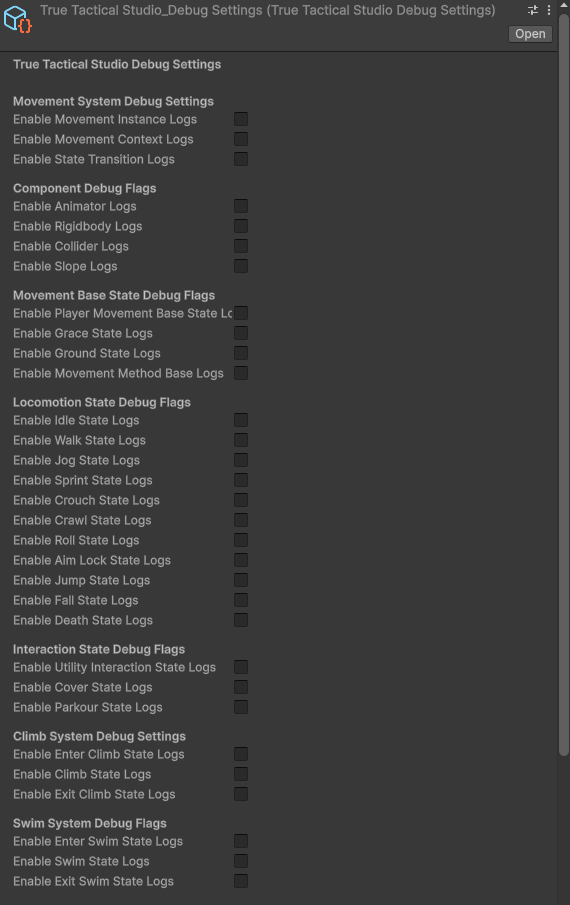
- ScriptableObject-driven → all debug flags live in a DebugSettings asset, making it easy to configure or create multiple debug profiles.
- Editor + Runtime Integration → toggle options in the Unity Inspector or flip them live during play mode with the runtime Debug UI.
- Granular Flags → control logs for entire systems (movement, IK, input, vitality, camera, UI, etc.) or drill down to a single state like “Vault” or “ExitSwim.”
- Safe in Production → debug UI disables itself automatically outside debug builds.
- Persistent Changes → a custom editor + saver utility ensure your debug preferences are stored and reloaded every time.
Use Cases
- Indie developers → quickly test locomotion, stamina, and parkour values.
- Studios → QA teams use the Debug Tool to verify player states and transitions.
- Technical artists → visualize IK and collider adjustments for polish.
- Prototyping → iterate rapidly with live feedback.
Closing: Debugging Without Guesswork Debugging a third-person controller shouldn’t feel like trial and error. With the Modular Third-Person Framework, you get a powerful Debug Tool built-in — so you can see, test, and tweak your systems with confidence.
👉 Get the Modular Third-Person Framework on the Unity Asset Store: Modular Third-Person Framework | Game Toolkits | Unity Asset Store