MTPSF - Modular Third Person Shooter Framework Documentation
Introduction
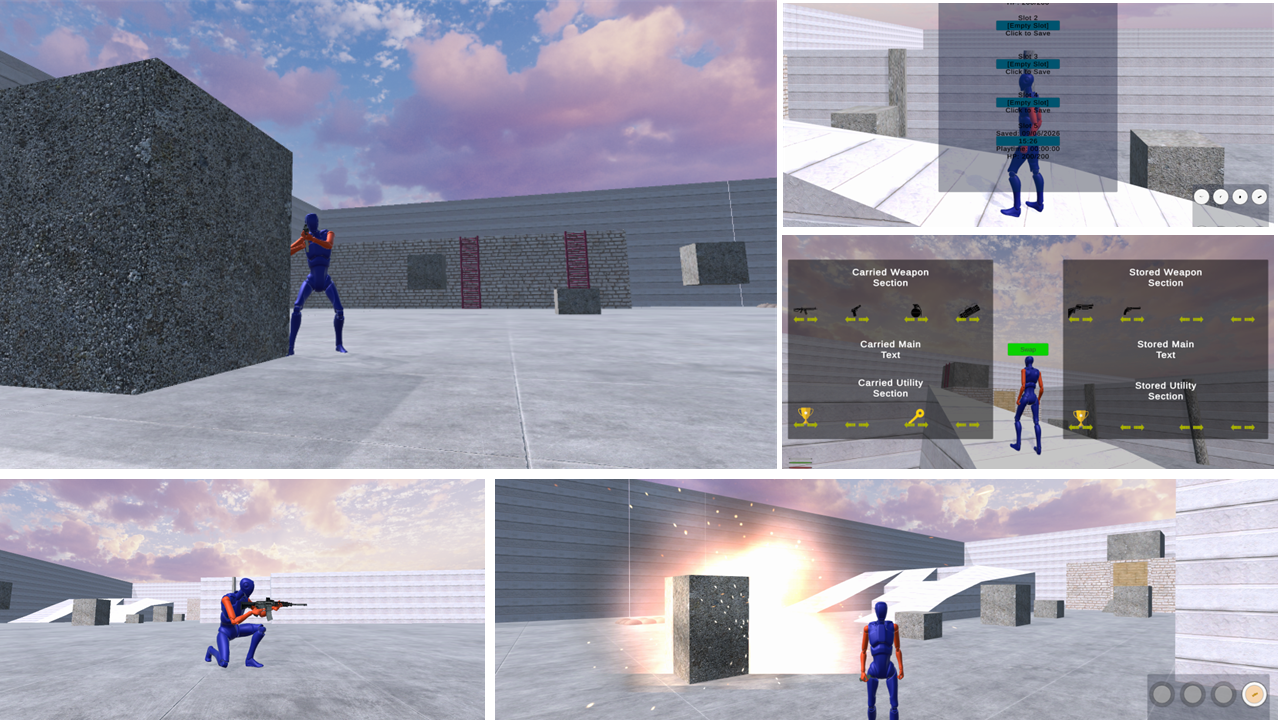
Welcome to the official documentation for the Modular Third Person Shooter Framework (MTPSF). MTPSF is a production-ready third person shooter framework for Unity built around modular architecture, extensibility, and long-term maintainability. Designed for developers who want a scalable and customizable foundation, MTPSF combines advanced locomotion, combat, inventory, utility, and interaction systems into a cohesive architecture-first solution. Built using composition over inheritance, interfaces, event-driven communication, state machines, dependency injection principles, and Scriptable-Object-driven configuration, MTPSF helps developers accelerate production while maintaining clean and maintainable code.
Overview
MTPSF provides a complete gameplay foundation for creating shooter games ranging from prototypes to full production projects. The framework combines all major systems from the Modular Third Person Framework (MTPF) with additional combat, inventory, utility, and weapon systems designed specifically for shooter gameplay. Developers can extend, replace, or customize individual systems without introducing unnecessary dependencies across the project. The framework is suitable for tactical shooters, military shooters, survival games, action games, adventure games, and custom third person projects.
Key Features
Combat Systems
- Firearms System
- Grenade System
- Explosives System
- Damage System
- Health System
- Scope System
- Crosshair System
- Cover System
- Character Death System
Inventory Systems
- Inventory Management
- Equipment Management
- Item Management
- Runtime Inventory Updates
- Save and Restore Inventory Data
Utility Systems
Utility Categories
- Consumables
- Equipment
- Key Items
- Quest Items
Utility Types
- Medic
- Stamina
- Armor
- Locked Keys
- Card Keys
- Objective Items
- Custom Utility Types
Movement & Interaction Systems
- Walk
- Jog
- Sprint
- Crouch
- Crawl
- Roll
- Climb
- Parkour
- Cover
- Swim
- Dive
- Interact
Technical Systems
- Save/Load System
- Object Pool System
- Animation Rigging System
- Camera Management System
- Character State Machines
- UI Management
- Runtime Debug Tools
Weapon Systems
MTPSF includes a fully modular weapon architecture designed for customization, scalability, and future expansion.
Weapon Categories
- Firearms
- Grenades
- Explosives
Supported Implementations
- Handguns
- Assault Rifles
- Sniper Rifles
- Shotgun
- SMGs
- Fragmentation Grenades
- Smoke Grenades
- C4 Explosives
- Custom Weapon Types
Ammo Systems
MTPSF supports multiple ammo management approaches to fit different gameplay requirements.
Shared Ammo System
- Multiple weapons can consume ammunition from a shared ammo pool.
- Suitable for weapon categories that use the same ammunition type.
- Centralized ammo management across inventory and equipment.
Per Weapon Ammo System
- Each weapon maintains its own independent ammunition pool.
- Allows unique ammo behavior per weapon.
- Ideal for specialized firearms and custom gameplay mechanics.
Additional Features
- Reload Mechanics
- Magazine Management
- Weapon Switching
- Scope Integration
- Crosshair Integration
- Damage Configuration
- Modular Weapon Configuration through Scriptable-Objects
The weapon architecture allows developers to create new firearms, grenades, explosives, ammo types, and weapon behaviors without modifying the existing framework.
Inventory & Utility Systems
The Inventory System manages equipment, utilities, weapons, and gameplay items through a flexible and expandable architecture. Features include:
- Runtime Item Management
- Equipment Slots
- Utility Assignment
- Item Usage Logic
- Inventory Persistence
- Inventory Save/Load Support
- Utility Classification
- Custom Item Creation
The utility architecture supports both gameplay and mission-oriented scenarios such as healing, objectives, access cards, and progression systems.
Object Pool System
The Object Pool System provides efficient runtime spawning and recycling of frequently used gameplay objects. Supported use cases include:
- Projectiles
- Explosions
- Visual Effects
- Impact Effects
- Utility Objects
- Gameplay Actors
This helps minimize runtime allocations and supports improved gameplay performance.
Animation Rigging System
MTPSF integrates Unity's Animation Rigging package to support advanced character interactions and combat behaviors. Examples include:
- Weapon Handling
- Aim Alignment
- Hand Placement
- Character Posing
- Runtime Animation Adjustments
The system is fully configurable and designed to integrate with the framework's weapon architecture.
Character States
MTPSF supports the following gameplay states: Idle • Walk • Jog • Sprint • Jump • Crouch • Crawl • Roll • Cover • Aim • Climb • Swim • Dive • Parkour • Interact • Reload • Use Utility • Die
Character transitions are managed through modular state machines to support maintainability and extensibility.
Core Architecture
MTPSF follows architecture-first development practices designed to reduce coupling and improve scalability.
Architectural Principles
- Composition Over Inheritance
- Interface-Based Design
- Event-Driven Communication
- Dependency Injection Principles
- Inversion of Control Principles
- State Machines
- Scriptable-Object Configuration
- Enum-Based Configuration
- Modular Managers
- Runtime Extensibility
The framework is designed to allow systems to communicate without unnecessary direct dependencies while remaining easy to customize.
Development & Customization
MTPSF was built to support customization at every level. Developers can:
- Create New Weapons
- Create New Utilities
- Add New Gameplay Features
- Configure Systems Through ScriptableObjects
- Replace Existing Components
- Extend State Machines
- Customize UI
- Build New Character Types
The modular architecture allows independent systems to evolve without impacting the rest of the project.
Compatibility
MTPSF supports:
- Unity New Input System
- Cinemachine
- Animation Rigging
- Unity Starter Assets (for demo characters)
Character Models & Animations
MTPSF is a gameplay framework and does not include production-ready character models, animation packs, or third-party art assets. Developers are required to import their own character models. The framework includes an Animator Controller with placeholder animation clips. Developers are required to import their own animation assets and replace the provided placeholder animations. If developers choose to create their own Animator Controller, they must ensure that the same Animator parameters and transitions used by the provided Animator Controller are maintained so that all framework systems continue to function correctly. MTPSF supports a wide variety of character and animation workflows, including:
• Custom Character Models
• Humanoid Character Rigs
• Animation Packs
• Motion Capture Animations
• Marketplace Assets
• Proprietary Studio Assets.
The framework provides the gameplay systems, architecture, and integration points required to connect custom content to the underlying gameplay mechanics.
Installation
- Purchase and download MTPSF from the Unity Asset Store.
- Import the framework into your Unity project.
- Install required Unity packages.
- Import or prepare your character model and animation assets.
- Drag the MTPSF Player Prefab into the scene.
- Replace the placeholder animations inside the Animator Controller.
- Configure gameplay systems through Scriptable-Objects.
- Connect character animations and animation rigging where required.
- Press Play.
Usage
- Configure player settings through Scriptable-Objects.
- Create weapons and utilities through modular configurations.
- Adjust animations using the Animation Rigging System.
- Customize UI and gameplay flow.
- Expand systems using interfaces and events.
Get Started Today
Build scalable third person shooter games faster with MTPSF's architecture-first approach. Combining advanced locomotion, combat, inventory, utility, interaction, save/load, object pooling, and extensibility systems, MTPSF provides a complete foundation for modern Unity shooter development. Explore MTPSF on the Unity Asset Store and start building your next game with a framework designed for long-term scalability, maintainability, and developer productivity.